Pilot Manager
The Gonky Racing desktop app for your Automobilista 2
Join rooms in one click, go through results and replays, follow your community, install circuits, liveries and mods without unzipping anything, set up force feedback for your wheel and get your rig ready with one button. It is GonkyRacing.com on your desktop. Free, Windows only, and it never writes anything into your game without backing up what was there first.
Free · Windows · updates itself
🏁 Races: the open rooms, and you join in one click
Every GonkyRacing room that is open right now, with its poster, track, class and drivers. Before you join it tells you whether you can drive straight away or a race is under way, and if the room needs a mod you don’t have, it installs it as you join. Click a room and you see who is inside, their times and which track comes next. Empty? Be the first in and the session starts with you. And with a headset, there is a Join in VR button.

🏆 Results: every race, and yours
The latest finished races with the same cards as the website: track, class, winner, drivers and duration. One button and you see only yours, with your position in each. Click one and its full classification opens — cars, gaps, best laps and pace — without leaving the app.

👥 Your community, inside the app
If you belong to a community, it is one click away, right above your profile: its board with the staff’s posts and the community’s races — with how each member did —, its GR league for the week, month or year, its server with a Join button and the next event with “remind me 30 minutes before”. Staff post on the board from the app itself, and members get a notification. Not in one yet? Discover communities and join from here.

🎬 Replays: the whole race, for every car
Open any replay you saved in AMS2 and see what the game doesn’t show you: the timing sheet with every lap and sector of every driver — invalid laps in red, slipstream laps marked —, the race pace with each driver’s average, consistency and trend, and in the Race tab the result and the playback on the map. Compare any lap with any other in one click, full screen if you like. And share it: with the drivers from that race — if it was raced on GonkyRacing, the app already knows who they were —, with whoever you pick, or with the Gonky Racing team. They get a notification and add it in one click.


📈 Telemetry: your car’s data, while you drive
It reads your AMS2 60 times a second and draws it for you: the exact circuit layout taken from the game itself — with the racing line, sectors and pit lane —, every car’s position, sector times and the session table. Split into tabs: Live, Rival, Strategy, Car, Analysis and My laps, where you go back over the laps you recorded. Cards can be dragged and placed wherever you like, and there is output to a second monitor.
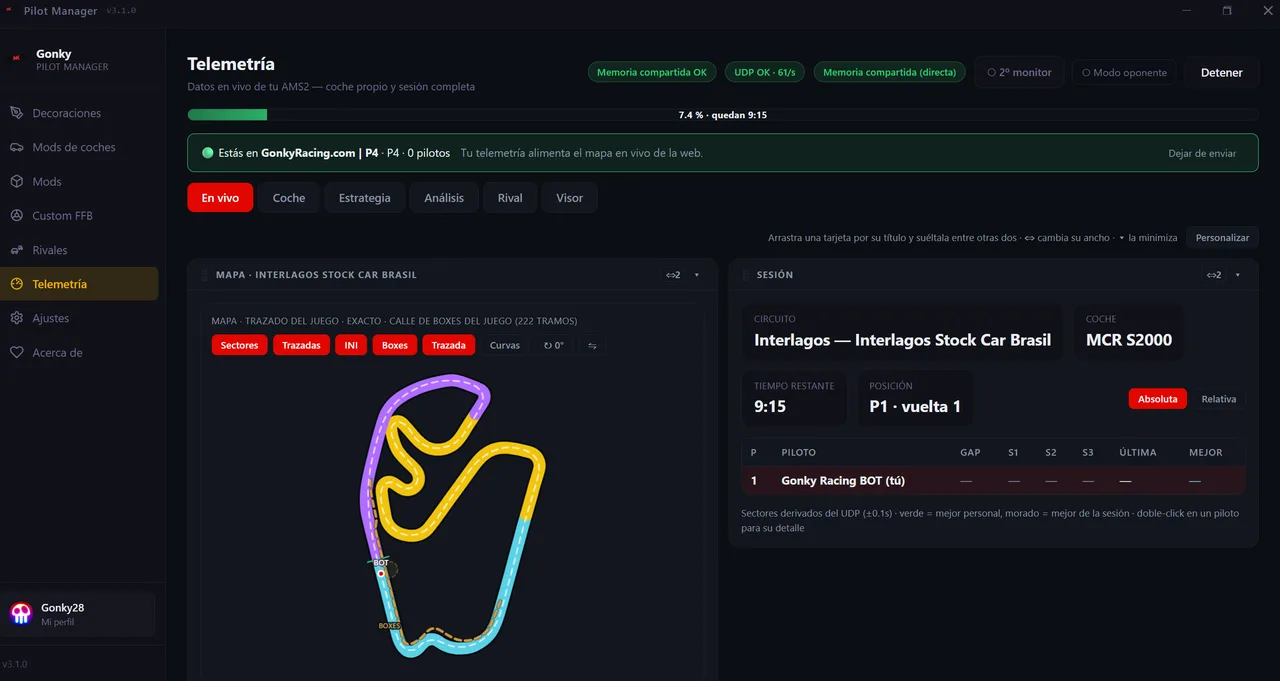
/live. One button turns it off, on the same screen.⚡ Ready / Go: your rig ready with two buttons
Ready opens the programs on your rig — SimHub, MOZA Pit House, Fanatec, Simagic, Simucube, Crew Chief… it finds them by itself, and you can add your own — and turns green once they are all running. Go launches AMS2, normal or in VR, and turns yellow once the game is open. You choose what each one opens in Settings, and if you don’t use them, you hide them from the menu.

🔔 Messages: your Gonky Racing notifications
The bell next to the logo brings the same as the one on the website — your race results, achievements, records, community invitations, replays people share with you —, with the unread count. And if something arrives while the app is open, a Windows notification pops up in the corner of the screen.
🎨 Liveries: one click and they are in the game
The AMS2 community livery catalogue, with the work of 17 modders across 15 car classes. Find yours, hit install, and the app puts it in the game folder. Every card says who made it, when it was published, and links to their original project.

🚗 Car mods: the GonkyRacing catalogue inside the app
Full packs — from 80s supercars to the DTM touring cars of the 90s — with the AMS2 version they need, who made them and when they were published, installed without leaving the app. Downloads go into a queue, one after another, and if something is wrong with a mod you report it in a short form that reaches its author.

🗺️ Track mods: one click and you are racing
Dozens of circuits converted by GonkyRacing and the community, installed in a single click. The app adds the circuit to the game’s own track list — no __bootfiles packages — and installs whatever each one needs on its own; if an AMS2 update undoes it, one button puts it back.

📦 My mods: your own, with no unzipping by hand
Drop a .zip, .rar or .7z on it and the app installs it into the AMS2 folder, which it finds by itself. It keeps track of what it put there, so it can take it out. 🔑 And it reminds you of the thing that actually bites in a modded room: everyone who joins needs exactly the same mods at the same versions.
🕹️ Custom FFB: the right file, and the numbers for your base
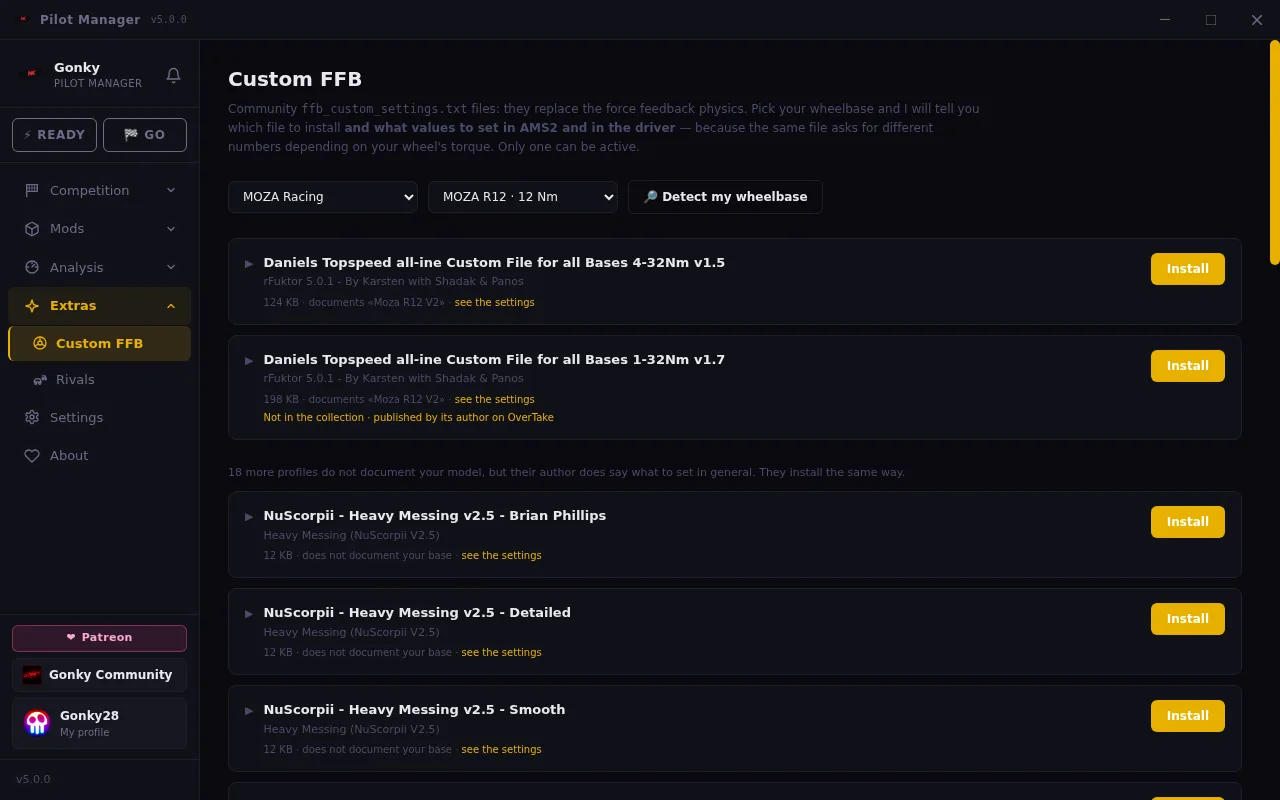
The community’s ffb_custom_settings.txt files change the force feedback physics, but the same file needs different numbers depending on your wheelbase’s torque, and that is not written down anywhere. Pick your base here — or hit detect mine — and we tell you which file to install and what values to set in AMS2 and in the driver. 43 files covering 38 of the 52 bases in the catalogue, credited to their authors, with your original file kept so you can go back.
🤖 Rivals: the AI grid for your single-player races
Swap the AI drivers for whoever you want: names, each one’s car and character — pace, aggression, defending and mistakes. Start from a blank grid on any of the 109 classes, open a community pack to see what it brings before installing it, or merge several into one.

🧭 How it works
- 1Download and install it. It finds the AMS2 folder by itself and keeps itself up to date; it only installs updates signed by Gonky Racing.
- 2Sign in with Steam (optional). Without it you get races, results, mods, FFB, Rivals, replays and telemetry; with it, also your profile, your community, your messages and replay sharing.
- 3Ready, Go… and onto the track. Ready opens your programs, Go launches the game, and from Races you join any room you like.
What do you need to get started?
Windows and Automobilista 2. That’s it: the app does the rest, and anything it changes in your game it can undo.
Free · Windows · updates itself